ear training with SOUNDGYM
We partner with the ear training practice platform SoundGym to help you develop better ear training skills for mixing and engineering, and a SoundGym license is included as part of your Futureproof membership.
We recommend frequent practice with SoundGym (3+ sessions a week) while you study with us to improve your listening skills, the basis of everything else you'll do as a producer.
To get started with SoundGym please follow these steps:
1. Click here to check your message inbox for the SoundGym signup code.
2. Go to the
SoundGym website and sign up for a new account.
-> IMPORTANT: USE THE SAME USERNAME YOU'RE USING WITH US SO WE CAN VERIFY YOU!
3. During the signup process, choose the free membership option.
4. After verifying your account, SoundGym will offer to create a personalized plan for you. Go ahead and select all options.
5. Next, SoundGym will give you a series of listening challenges to assess your current skills. Do your best on these, this will determine where you start in the practice exercises.
6. After you finish the listening challenges, you need to enter the unique code you received in your email. Click on your avatar at top-right of SoundGym to go to your Account Settings and navigate to the 'School' tab.
7. Enter the code that was sent to your email and click 'Join':
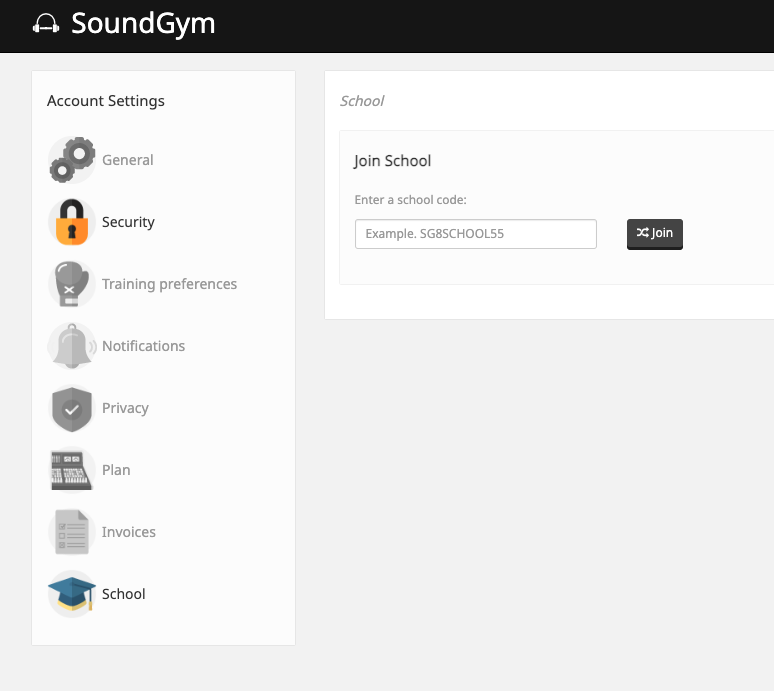
By following these steps, you'll be linked to the Futureproof account on SoundGym and we'll assign you a paid license. This will give you full access to and allow us to track your progress.
If you haven't received your signup code or encounter any issues during this process, please send a message to @johnvon or ping us on Discord, we're here to help.
Note: we have to assign your license manually so you'll get it the next business day.